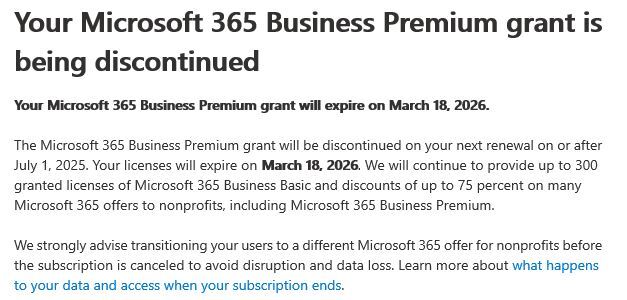
On May 15th 2025 Microsoft announced that they would no longer be providing donations of 10 Free Business Premium Microsoft 365 licenses to non profits. When the license subscription runs out non profits will now have to pay for this licensing (allbeit at a discounted rate from the standard Microsoft prices). Non profits affected by this should have received something like the below.
For an organisation with 10 free licenses, the typical cost for these going forward (even with 50-75% discounts) will be potentially £5-6 per month per user – adding an extra £50-60 per month to your monthly expenditure.
This is a big blow to all non profits across the world as over the last few years, these licenses have provided the backbone to a lot of small non profits IT systems and have meant that they can divert funds to other important areas of the organisation.
These licenses also provide secuity and efficiency benefits to non profits as they benefit from the variety of email, data storage and applications that come with that package.
Organisations up and down the country are being hit by what feels like a second cost of living crisis…and non profits are feeling this more than ever. With increased supply chain costs and the governments NI increase, this couldn’t have come at a worse time.
As an IT provider who has regularly provisioned these licenses to clients over the past few years, we are currently working through a number of actions to help mitigate these changes. It’s unlikely, at this stage, that Microsoft will announce a new non profit scheme that will offer totally free licenses so we are currently discussing with licensing providers to get the very best discounts on Microsoft 365 licensing. We are also keeping our ear out to see if there is the remote chance of new non profit donation schemes.
My strong recommendation for all non profits reading this article is to log into your Microsoft 365 admin account and click on Billing, Licensing and then click on your Business Premium licenses and check when it expires. If you do nothing and let these licenses expire then you will be left in a scenario where emails may stop working, file access removed and a variety of other issues.
Once you know when these expire you can either speak to your existing licensing provider or another provider such as ourselves to get new licensing in place ahead of the expiry.
If you are interested in anything detailed in this blog please contact me at [email protected] or on 01473 345321 and I’d be happy to have a discussion about it.